
Exporting data to and from CluedIn with Python
how-to Steps to accomplish one task
On this page
In this article, we will load data from CluedIn to a Databricks notebook, do basic data exploration and transformation, and save data in a Delta Lake table. The same approach can be used with any other data destination like Microsoft Fabric, Azure Synapse Analytics, Snowflake, or any other data destination that can run Python code.
CluedIn
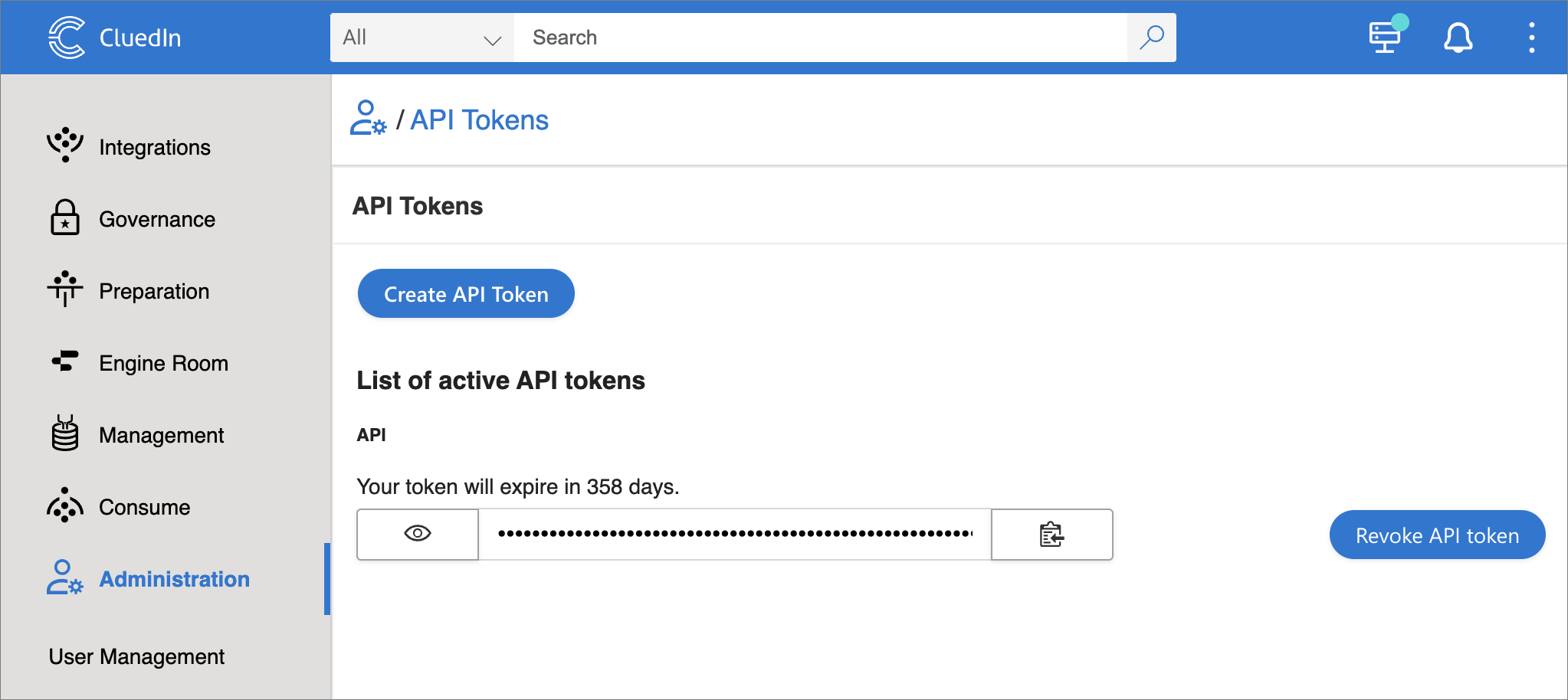
Our CluedIn instance has 601_222 entities of /IMDb/Title. To load them in Databricks, we need to create an API token in CluedIn. Go to Administration > API Tokens and create a new token.
Databricks
Install dependencies
To connect to CluedIn API, we need to install the cluedin library.
%pip install cluedin==2.2.0
Import libraries
We need the following libraries.
import pandas as pd
import matplotlib.pyplot as plt

import cluedin
Connect to CluedIn
-
To connect to CluedIn, we need to provide the URL of our CluedIn instance and the API token we created earlier.
# CluedIn URL: https://foobar.mycluedin.com/: # - foobar is the organization's name # - mycluedin.com is the domain name cluedin_context = { 'domain': 'mycluedin.com', 'org_name': 'foobar', 'access_token': '(your token)' } -
Now, let’s pull some data from CluedIn. We will fetch only one row to see what data we have.
 # Create a CluedIn context object.
 ctx = cluedin.Context.from_dict(cluedin_context)

 # GraphQL query to pull data from CluedIn.
 query = """
 query searchEntities($cursor: PagingCursor, $query: String, $pageSize: Int) {
   search(
     query: $query
     cursor: $cursor
     pageSize: $pageSize
     sort: FIELDS
     sortFields: {field: "id", direction: ASCENDING}
   ) {
     totalResults
     cursor
     entries {
       id
       name
       entityType
       properties
     }
   }
 }
 """

 # Fetch the first record from the `cluedin.gql.entries` generator.
 next(cluedin.gql.entries(ctx, query, { 'query': 'entityType:/IMDb/Title', 'pageSize': 1 }))
Output:
 {'id': '00001e32-9bae-53b9-a30f-cf30ed66c360',
  'name': 'Murder, Money and a Dog',
  'entityType': '/IMDb/Title',
  'properties': {'attribute-type': '/Metadata/KeyValue',
   'property-imdb.title.endYear': '\\N',
   'property-imdb.title.genres': 'Comedy,Drama,Thriller',
   'property-imdb.title.isAdult': '0',
   'property-imdb.title.originalTitle': 'Murder, Money and a Dog',
   'property-imdb.title.primaryTitle': 'Murder, Money and a Dog',
   'property-imdb.title.runtimeMinutes': '65',
   'property-imdb.title.startYear': '2010',
   'property-imdb.title.tconst': 'tt1664719',
   'property-imdb.title.titleType': 'movie'}}
For performance reasons and to avoid collisions, it’s important to sort the results by a unique field in the GraphQL query. Entity ID works just fine.
sort: FIELDS sortFields: {field: "id", direction: ASCENDING} -
Now, let’s pull the whole dataset in a pandas DataFrame. However, we’ll need to flatten the properties and remove unnecessary property name prefixes. and replace dots with underscores to make it compatible with the Spark schema.
 ctx = cluedin.Context.from_dict(cluedin_context)

 query = """
 query searchEntities($cursor: PagingCursor, $query: String, $pageSize: Int) {
   search(
     query: $query
     sort: FIELDS
     cursor: $cursor
     pageSize: $pageSize
     sortFields: {field: "id", direction: ASCENDING}
   ) {
     totalResults
     cursor
     entries {
       id
       properties
     }
   }
 }
 """

 def flatten_properties(d):
     for k, v in d['properties'].items():
         if k == 'attribute-type':
             continue
         if k.startswith('property-'):
             k = k[9:] # len('property-') == 9
         k = k.replace('.', '_')
         d[k] = v
     del d['properties']
     return d

 df_titles = pd.DataFrame(
     map(
         flatten_properties,
         cluedin.gql.entries(ctx, query, { 'query': 'entityType:/IMDb/Title', 'pageSize': 10_000 })))

 df_titles.head()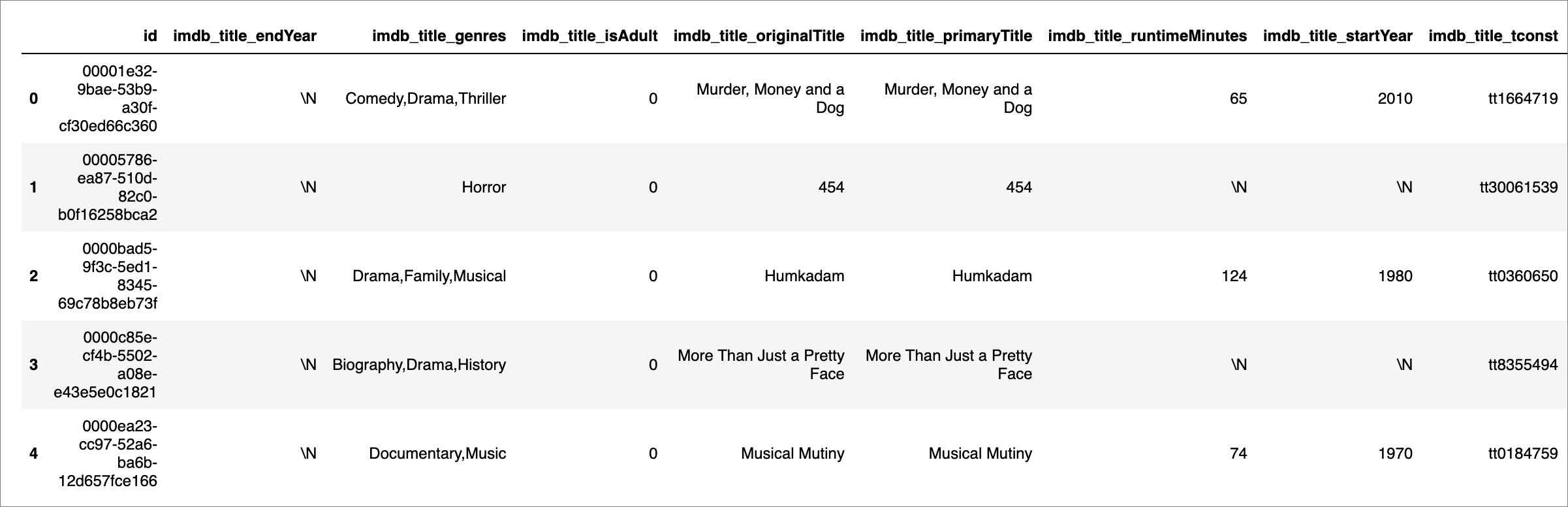
-
One thing left to fix here. Let’s set the DataFrame’s index to Entity Id.
 df_titles.set_index('id', inplace=True)
 df_titles.head()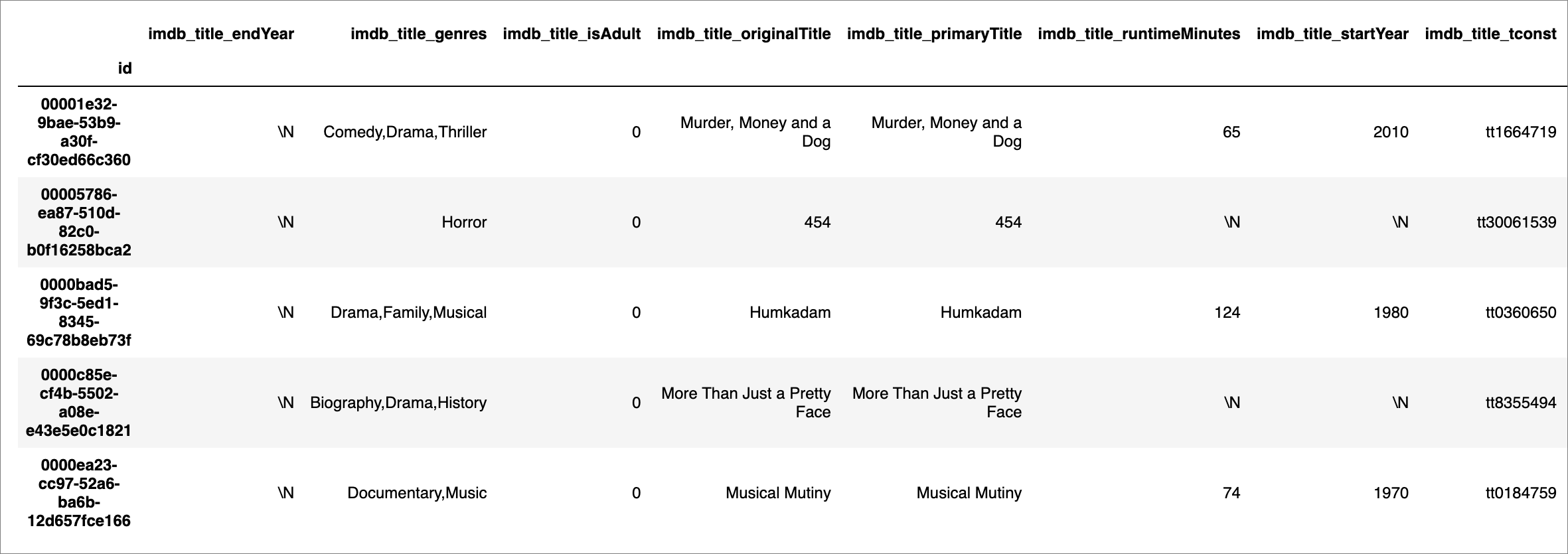
Explore data
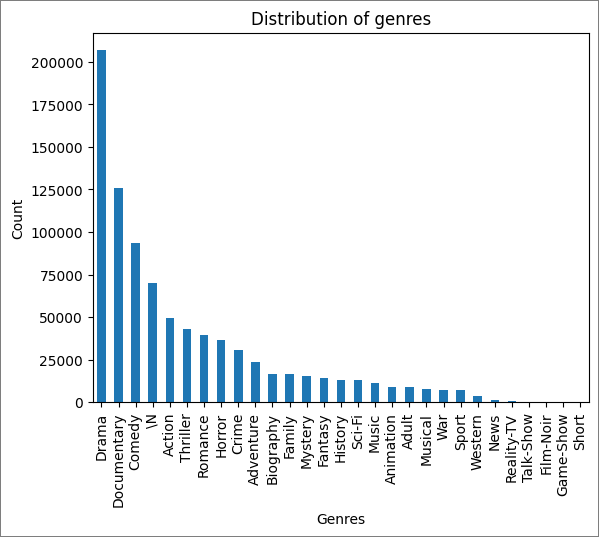
Let’s see how many movies we have by genre.
df_titles['imdb_title_genres'].str.split(',', expand=True).stack().value_counts().plot(kind='bar')
plt.title('Distribution of genres')
plt.xlabel('Genres')
plt.ylabel('Count')
plt.show()
Create schema
Now, let’s create a schema for our data (mind that imdb_title_genres is a string, not an array, so we need to split it).
from pyspark.sql import SparkSession
from pyspark.sql.types import StructType,StructField, StringType, ArrayType, IntegerType
from pyspark.sql.functions import split

spark = SparkSession.builder.getOrCreate()

schema = StructType([
    StructField('id', StringType(), True),
    StructField('imdb_title_endYear', StringType(), True),
    StructField('imdb_title_genres', ArrayType(StringType()), True),
    StructField('imdb_title_isAdult', StringType(), True),
    StructField('imdb_title_originalTitle', StringType(), True),
    StructField('imdb_title_primaryTitle', StringType(), True),
    StructField('imdb_title_runtimeMinutes', StringType(), True),
    StructField('imdb_title_startYear', StringType(), True),
    StructField('imdb_title_tconst', StringType(), True),
    StructField('imdb_title_titleType', StringType(), True)
    ])

df_spark_titles = spark.createDataFrame(df_titles)

df_spark_titles = df_spark_titles.withColumn('imdb_title_genres', split(df_spark_titles.imdb_title_genres, ','))

spark.sql('CREATE DATABASE IF NOT EXISTS cluedin')

df_spark_titles.write.mode('overwrite').format('parquet').saveAsTable('cluedin.imdb_titles', schema=schema)
display(df_spark_titles)
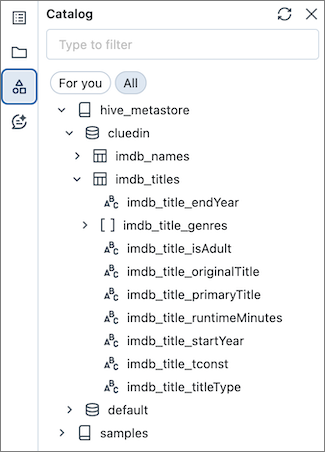
Now, we can see our data in the Catalog.