


Copy snapshots runbook
how-to Steps to accomplish one task
On this page
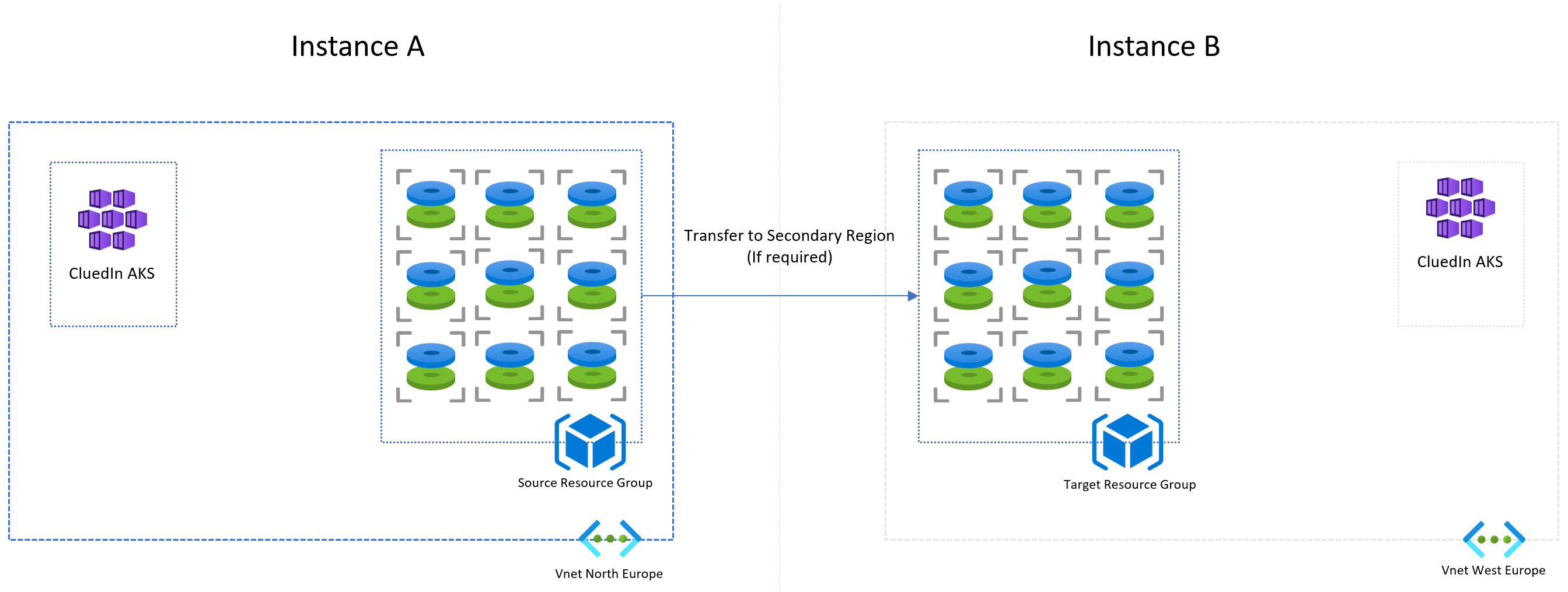
The copy snapshots runbook can be triggered manually or on a set schedule. It copies snapshots from one Azure location to another. However, if your source and target CluedIn instances are the same or reside in the same Azure location, this runbook is not required.
This runbook is a PowerShell script that CluedIn will provide as needed.
Prerequisites
- At least one active CluedIn cluster with a valid license
- The runbook script
- An automation account
- A storage account
- Sufficient permissions
Typical snapshots
Typically, Cluedin requires nine snapshots, which will be attached to the disks during a restore process. The snapshot type is incremental.
Automation account
An automation account must be provided, the runbook will be installed into the the automation account. Typically, the runbook should be triggered once the snapshots have been created successfully.
Transfer of snapshots
Snapshot transfers occur over the Microsoft backbone and can take anywhere from 20 minutes for small datasets to several hours for larger ones. Additionally, Azure inter-region transfer costs will apply.
Input parameters
| Parameter | Default | Description |
|---|---|---|
| LicenseKey | required | License key tag on snapshot |
| Timestamp | required | Timestamp on snapshot |
| SourceResourceGroup | required | Name of source resource group |
| TargetSubscriptionId | required | ID of target Azure subscription |
| TargetResourceGroup | required | Name of target resource group |
| TargetRegion | required | Target Azure location |
Process

When the source and target resource groups are in the same location, the snapshot copy is not neccessary.