

Best practices for rules
concept Explains how something works
On this page
In this article, you will learn about best practices for data part and golden record rules. In particular, we will examine the case of tagging data quality issues and why golden record rules are the preferred way to do this.
Generally, use data part rules for fixing data and golden record rules for tagging data quality issues. Next, we will provide two examples to illustrate this recommendation.
Example 1
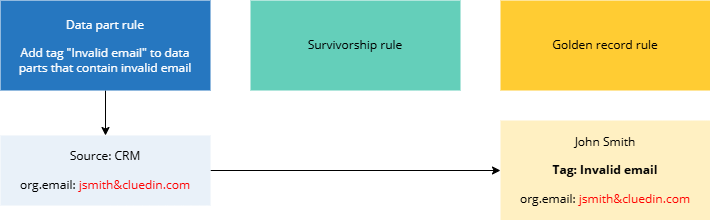
Suppose you want to tag golden records that contain invalid emails with “Invalid email”. Let’s start from a golden record that is built from one data part from the CRM source. The data part contains an email property with invalid value (jsmith&cluedin.com). At this point, it does not matter if you use a data part rule or a golden record rule to tag records with invalid email because the golden record contains just one data part. If we use a data part rule, the golden record that contains invalid email will be tagged with “Invalid email”.
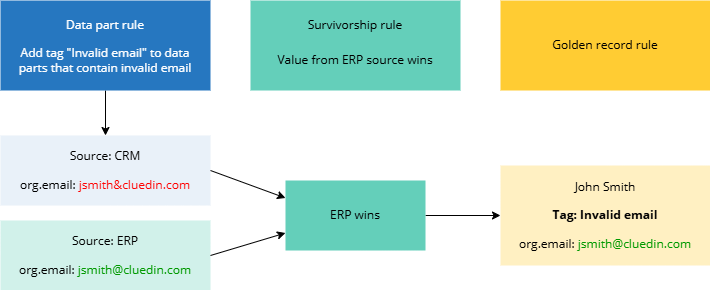
As long as the golden record contains just one data part, the above setup is correct. However, what if the golden record contains multiple data parts, each with its own email property? Suppose we add another data part from a different source (ERP) to the golden record. This data part also contains the email property, but it has a valid value (jsmith@cluedin.com). At this point, we also add a survivorship rule that tells CluedIn to use the property from the ERP source in the golden record. As a result, the golden record contains a valid email from the data part of the ERP source, but it is still tagged with “Invalid email”. This is because the data part rule is applied to each data part of the golden record, even if the properties from a specific data part are not used in the golden record due to a survivorship rule.
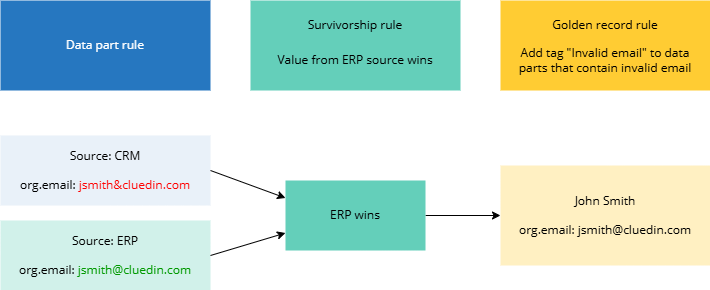
To avoid irrelevant tags in golden records, use golden record rules for tagging data quality issues. The golden record rules take into account only the properties of the golden record, not the properties of its specific data parts. As a result, the “Invalid email” tag is not added to the golden record because the email property used in the golden record is valid.
Example 2
For this example, we will start with a data part rule that targets data parts that from a particular source—CRM. The data part contains an email property with invalid value (jsmith&cluedin.com). This is the only data part in the golden record, so the golden record is tagged with “Invalid email”.
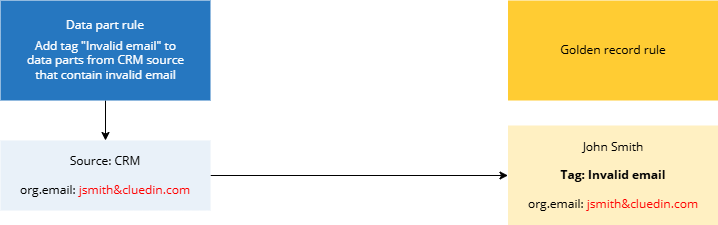
Now that we’ve identified an invalid email, we can add a data part rule to replace invalid email with a valid one in data parts from the CRM source. When the email in the data part is replaced with a valid value, the previous data part rule that tagged invalid emails becomes irrelevant and the “Invalid email” tag disappears from the golden record.
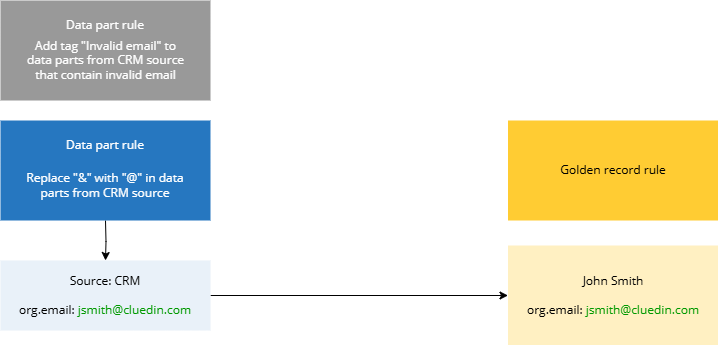
Next, we add another data part from a different source—ERP. This data part contains invalid email (jsmith&cluedin.com). In this example, we are not using a custom survivorship rule. Instead, we rely on default survivorship mechanism, which picks the most recent value for the golden record. Since the ERP data part appeared after the CRM data part, it is used in the golden record. As a result, the golden record contains invalid email address, but it is not tagged with “Invalid email”. This is because the data part is applied only to data parts from the CRM source, it is not targeted at data parts from the ERP source.
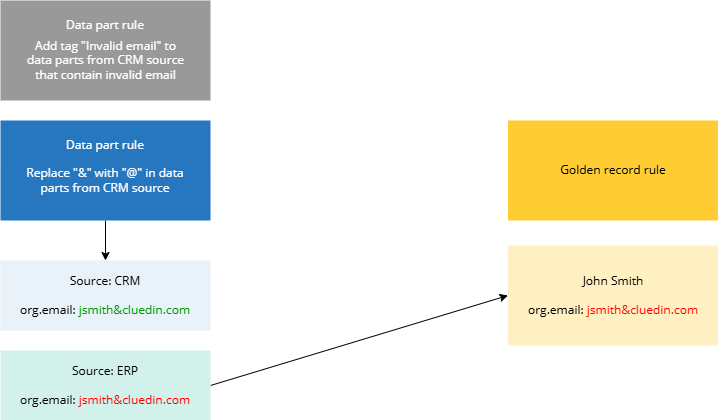
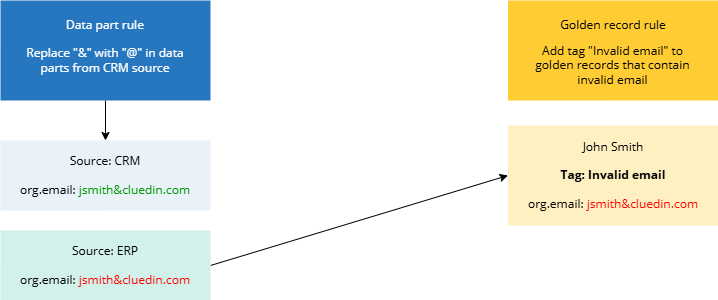
To make sure that invalid emails are flagged regardless of the source, use a golden record rule instead of the data part rule. The golden record rule is executed based on the properties of the golden record. As a result, the “Invalid email” tag is added to the golden record because the email property used in the golden record is invalid.
Summary
To sum up, if you want to flag data quality issues, use golden record rules. This way, you can be sure that the tag is added based on the end values that are used in your source of truth—a golden record. For more information, see our article How to tag records with data quality issues.