Writing Back to Target Datasources (Event Hub / Dataverse patterns)
On this page
- Before you start
- Data modelling for write-back
- Write-back concept
- High-level architecture
- Pattern A: Event Hubs + Power Automate
- Pattern B: Dataverse + Power Automate
- Pattern C: Event Hubs + ADLS Gen2 + Azure Data Factory (ADF)
- Pattern D: OneLake + Fabric Data Pipelines
- Pattern comparison (pros & cons)
- Quick recommendation
| Audience | Time to read |
|---|---|
| Data Engineer / Integration Developer | 10–15 min |
This page explains supported write-back integration patterns for sending mastered/curated data from CluedIn to operational systems. Each pattern uses CluedIn Streams to emit changes and a downstream integration layer to update target applications and databases.
Before you start
You should already be comfortable with:
- CluedIn modelling glossary (Business Domains and Vocabularies)
- Streams in CluedIn (what gets emitted, when, and in what mode)
- Event-driven integration basics (idempotency, retries, DLQs)
- Power Automate and/or Azure Data Factory fundamentals
- Basic security concepts (managed identity, least privilege)
Data modelling for write-back
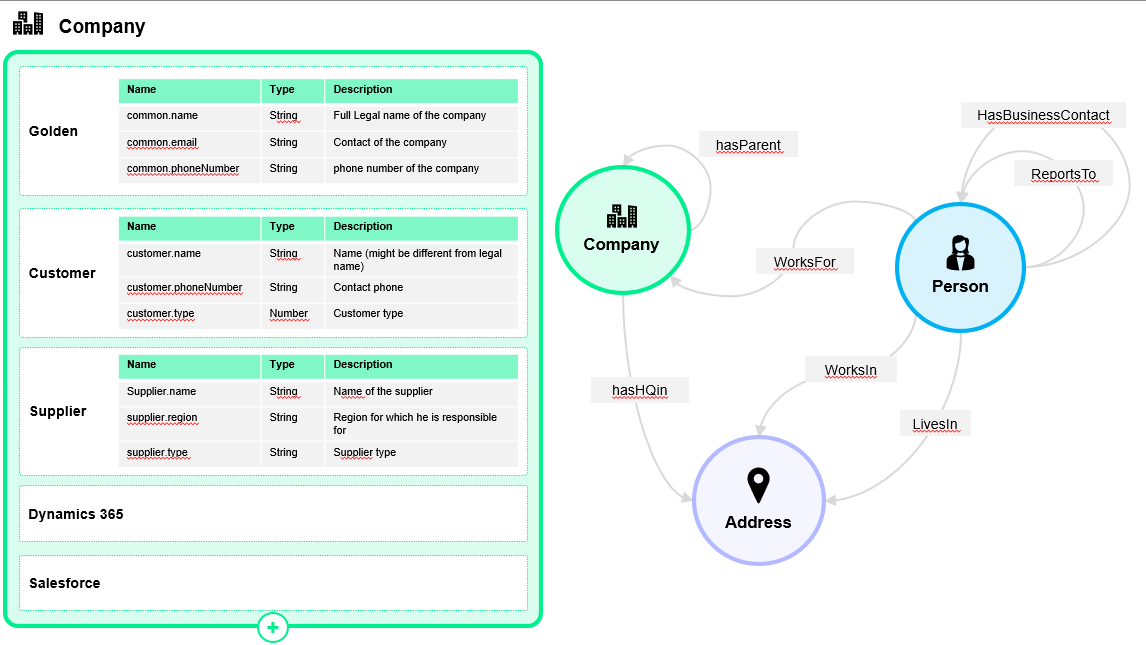
Writing data back to source/target systems is rarely a 1:1 mapping problem. The same business concept can be represented differently across consumers (for example, country as ISO-2, ISO-3, or an internal numeric code).
Best practice: create a Vocabulary per consumer system.
CluedIn models data using Business Domains and Vocabularies. Multiple vocabularies for the same entity lets you keep semantic meaning consistent while adjusting representation per consumer. This enables:
- transparent, auditable mappings
- no-code transformations where applicable
- reduced downstream custom code
- per-consumer contract stability
For each consumer system, create a dedicated Stream that emits changes using the consumer’s vocabulary.
Write-back concept
Write-back means: CluedIn publishes mastered changes, then an integration layer applies those changes into operational systems.
Key concerns you must design for (regardless of pattern):
- Idempotency: the same event may be delivered more than once; updates must be safe to repeat.
- Ordering: consumers may see out-of-order events; use a version/timestamp and “last-write-wins” rules where needed.
- Retries & DLQ: transient failures should retry; poison messages must be captured and investigated.
- Schema evolution: version your payloads and keep transformations explicit.
- Observability: track correlation IDs end-to-end.
High-level architecture
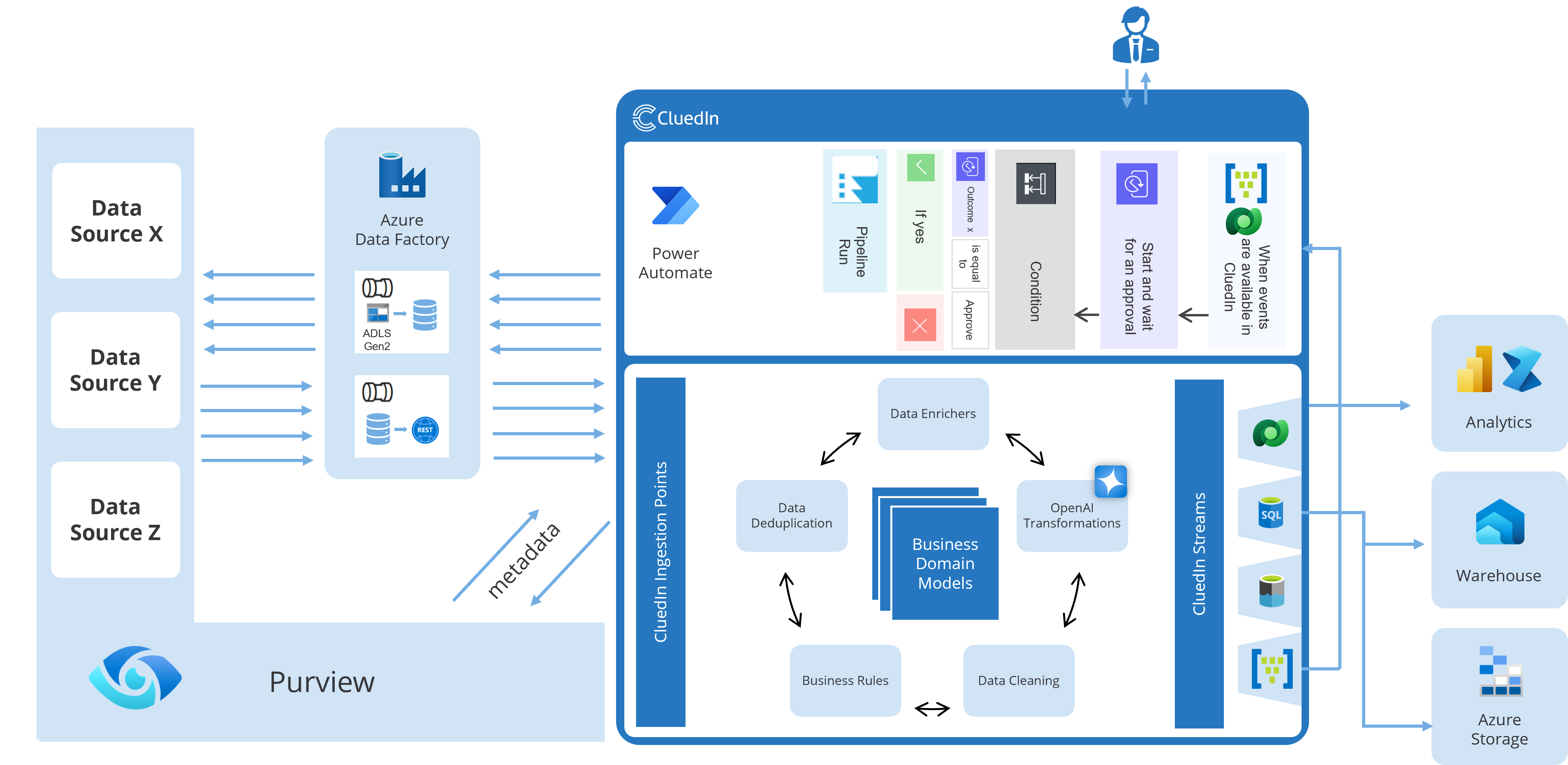
All patterns follow the same idea: CluedIn Stream → hand-off layer → orchestration/pipeline → target system.
High-level flow (all patterns)
The most common approaches are:
- Pattern A: Stream → Event Hubs → Power Automate → Target
- Pattern B: Stream → Dataverse → Power Automate → Target
- Pattern C: Stream → Event Hubs + ADLS Gen2 → Azure Data Factory → Target
- Pattern D: Stream → OneLake → Fabric Data Pipeline → Target
Pattern A: Event Hubs + Power Automate
What it is
CluedIn emits entity-change events to Azure Event Hubs. Power Automate subscribes (directly or via a connector) and performs updates in the target system (API, Dataverse, SQL, SaaS app, etc.).
When to use
- You want near-real-time propagation
- You need fan-out to multiple consumers
- You want to keep targets decoupled from CluedIn
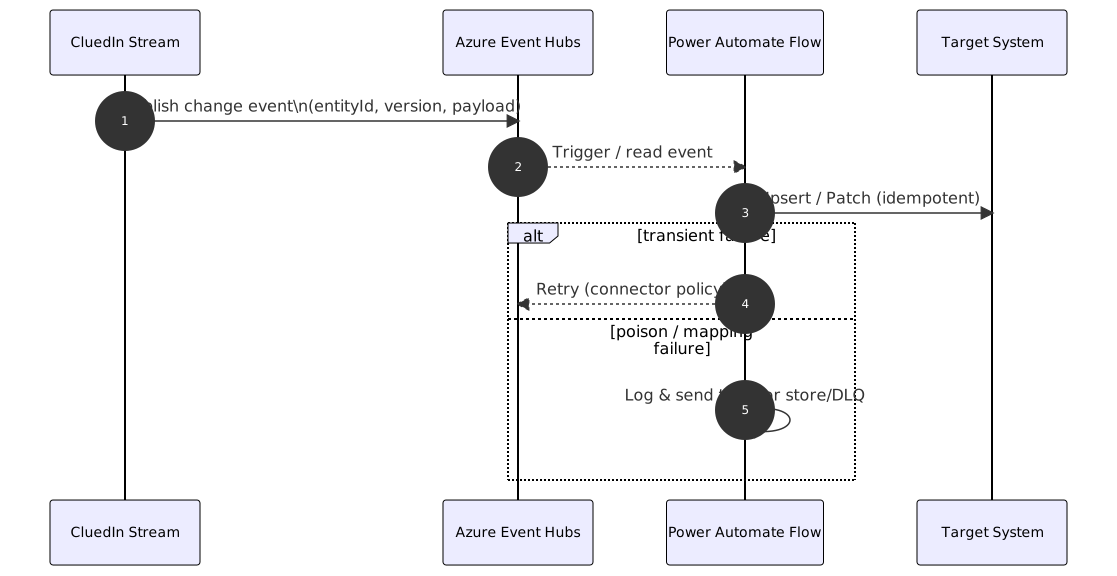
Flow
Implementation notes
- Idempotency key: use
entityId + version(or a stable event ID) to avoid duplicate writes. - Target upsert: prefer PATCH/UPSERT semantics over “insert then update”.
- DLQ/error handling: store failed payload + error + correlation ID (e.g., Storage/Dataverse table).
- Throughput: if volumes are high, keep flows lightweight and move complex transformations into Functions/Logic Apps.
Pros
- Low-latency, event-driven
- Scales well on ingest; supports multiple subscribers
- Clean decoupling between CluedIn and targets
Cons
- Power Automate is not ideal for very high-throughput or complex orchestration
- Backfills/replays require extra design (checkpointing, replay windows)
- Requires careful handling of retries and duplicates
Pattern B: Dataverse + Power Automate
What it is
CluedIn writes curated entities to Microsoft Dataverse (as tables aligned to the consumer vocabulary). Power Automate triggers on row changes and synchronizes to the target system.
When to use
- Your operational landscape is Power Platform / Dynamics heavy
- You want governed data tables as the hand-off contract
- You want business-friendly auditing and security in the hand-off layer
Flow

Implementation notes
- Model Dataverse tables to reflect your consumer contract (avoid “one giant JSON field” unless unavoidable).
- Use Dataverse row version / modified-on to drive “last update wins”.
- Apply field-level security and auditing where needed.
- For high volume: consider batching changes or using alternative orchestration (Logic Apps/Azure Functions).
Pros
- Very natural for Microsoft business apps
- Strong governance, audit, permissions
- Simple trigger semantics for business workflows
Cons
- Dataverse introduces cost/storage and schema constraints
- Less suitable as a high-throughput event backbone
- Additional mapping effort (CluedIn → Dataverse schema)
Pattern C: Event Hubs + ADLS Gen2 + Azure Data Factory (ADF)
What it is
CluedIn emits events to Event Hubs and also lands data to Azure Data Lake Storage Gen2 (raw/curated zones). Azure Data Factory pipelines orchestrate transformations and write to targets (APIs/DBs/SaaS) either incrementally or in batch.
When to use
- You need robust orchestration and repeatability
- You want batch + incremental options
- You expect reprocessing/backfills and stronger data lineage
Flow

Implementation notes
- Use ADLS as the “system of record” for reprocessing (keep raw events immutable).
- ADF can be triggered by Event Hubs (via intermediary) or scheduled; choose based on latency needs.
- Implement “quarantine” zones for bad records and replay after fixes.
- Treat write-back as a contract: keep transformations versioned and reviewed.
Pros
- Strong orchestration and operational control
- Easy reprocessing, replay, and backfills
- Handles heavy transforms and validations better than low-code flows
Cons
- More moving parts to operate (EH + ADLS + ADF)
- Typically higher latency than direct event-to-flow
- Requires disciplined lake/pipeline conventions
Pattern D: OneLake + Fabric Data Pipelines
What it is
CluedIn lands mastered data into OneLake. Microsoft Fabric Data Pipelines (and optionally notebooks/dataflows) process and push updates to target systems.
This pattern is often used when the same mastered data also feeds analytics and reporting in Fabric.
When to use
- Your organization is Fabric-first
- You want a unified approach: analytics + serving
- You prefer Fabric governance/ops over “classic” ADF + ADLS
Flow

Implementation notes
- Treat OneLake curated data as your governed contract.
- If you need near-real-time operational sync, design micro-batch intervals and clear SLAs.
- Keep a quarantine/error dataset for failed writes and replays.
- If you also run analytics, keep “serving” transformations separate from “reporting” transformations.
Pros
- Unified Fabric ecosystem (storage + pipelines + governance)
- Great when the mastered data must serve both BI/analytics and downstream apps
- Modern, centralized operations for Fabric estates
Cons
- Usually not true real-time; more micro-batch by nature
- Operational write-back connectors vary by target; may need custom steps
- Requires Fabric platform maturity and skillset
Pattern comparison (pros & cons)
| Pattern | Best for | Pros | Cons |
|---|---|---|---|
| A: Event Hubs + Power Automate | Near-real-time, event-driven updates to business apps | Low latency, decoupled, scalable ingest, good fan-out | Power Automate can become complex at scale; harder batch backfills; careful idempotency required |
| B: Dataverse + Power Automate | Microsoft-centric operational apps (Dynamics/Power Platform) | Native data model, governance, audit, simple triggers, good for business workflows | Extra storage/cost; Dataverse schema constraints; not ideal for high-throughput event streams |
| C: Event Hubs + ADLS Gen2 + ADF | Enterprise-grade pipelines, batch + incremental, heavy transforms | Strong ETL/ELT, robust orchestration, easy reprocessing/backfills, separation of concerns | More components to operate; higher latency than pure event push; needs solid data-lake conventions |
| D: OneLake + Fabric Data Pipelines | Fabric-first orgs, analytics + operational handoff, modern data estate | Unified Fabric experience, governance with Fabric, great for downstream analytics + serving | Not a pure eventing pattern by default; operational updates may be less immediate; Fabric skills/ops maturity required |
Quick recommendation
If you need:
- Fast event propagation with minimal platform footprint → Pattern A
- Power Platform / Dynamics-native hand-off → Pattern B
- Enterprise-grade orchestration + replay/backfill → Pattern C
- Fabric-first unified data estate → Pattern D